Working Time Model
A working time model supports a smooth workflow within a business process. It defines how an employee’s working time is distributed.In Xpert-Timer, you can create any number of working time models. You can find the overview of all models in the configuration of Time Tracking on the “Working Time Models” tab.
A working time model consists of individual working days and defines flexitime, framework time, and core working hours within the company.
Framework time:
Framework time defines the period during which an employee is allowed to be present.
Core working hours:
Core working hours define the period during which the employee must be present.
Flexitime:
Flexitime is the time span within the framework time during which the employee can freely choose their start and end of work.
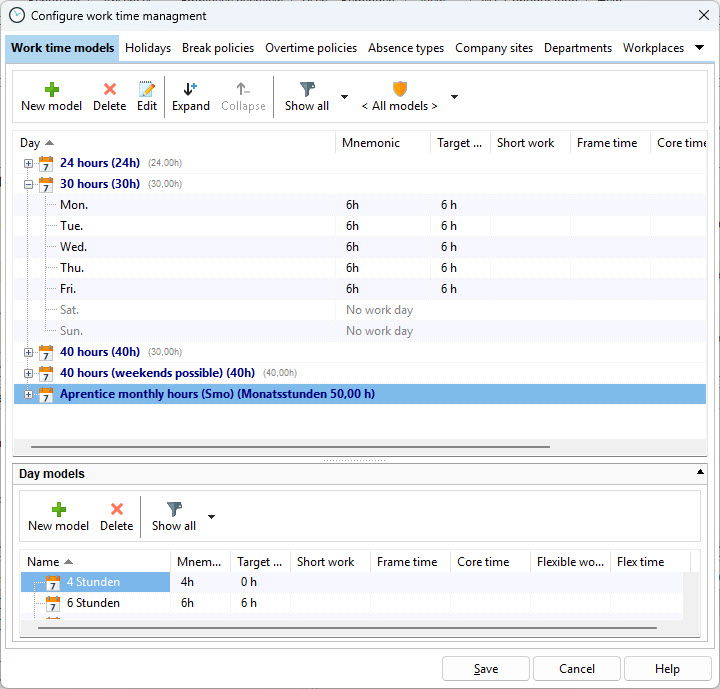
Use the “New Model” menu item to create a new working time model.

Abbreviation |
The abbreviation is used in some reports to save space. |
Vacation value / day |
The averaged value of one vacation day in hours. Usually 8 hours. |
Break Mode
In many companies, the standard is a flexible break of 60 minutes combined with the statutory break regulation.
The differences between the break modes:
Flexible break: For example, you can specify 60 minutes that an employee is expected to take per day (defined in the daily model). Through individual clock-in and clock-out actions, the employee accumulates these 60 minutes over the course of the day and is notified if more than 60 minutes of break time are taken. If you set this value to 0 minutes, break duration is not checked and no warning is displayed.
Fixed break: If your company processes require fixed employee breaks, you can define up to three break periods in the daily model. These breaks are then clocked automatically without the employee having to clock in or out.
<None>: If you do not require an exact representation of break times in the time stamps, you can rely solely on the statutory break regulation. In this case, the employee must manage breaks manually via clock-in and clock-out; otherwise, statutory breaks are deducted automatically at the end of the day.
Assign a descriptive name, for example “24-hour Part-Time”. A working time model consists of different daily models. If no suitable daily model is available, you can create a new one using the “Plus” icon.
Flexitime allowed |
Enable this option to receive notifications when time stamps occur outside of flexitime. |
Use framework time |
Enable this option to receive notifications when time stamps occur outside of the framework time. |
Use core working hours |
Enable this option to receive notifications when time stamps occur outside of core working hours. |
Consider short-time work |
Enable this option if you want to apply short-time work hours according to the daily model. |
Monthly Hours
If you manage working time based on monthly hours, set the weekly model type to “Monthly hours”. Define the number of hours that make up one vacation day and select the working days that are relevant for vacation requests and vacation calculation. By default, employees working on a monthly-hours basis can work on any day, including weekends. As a result, weekends are also counted as vacation days unless they are excluded in this dialog.
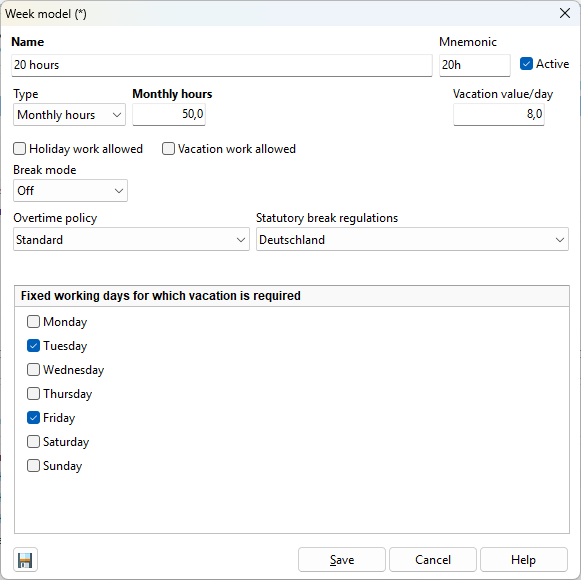
Therefore, specify here the days for which a vacation day should be counted.