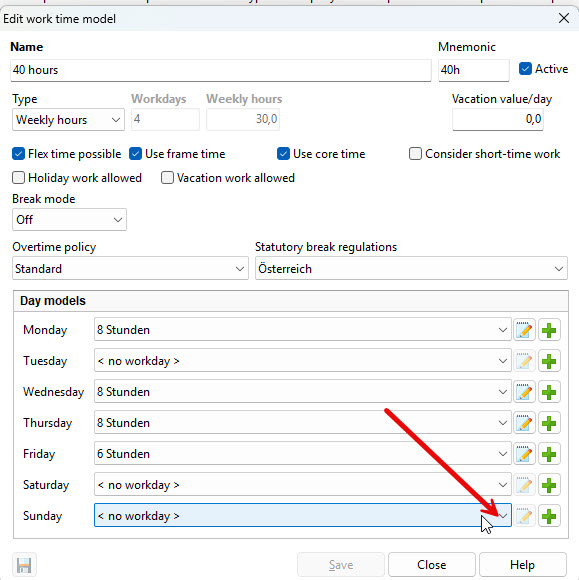
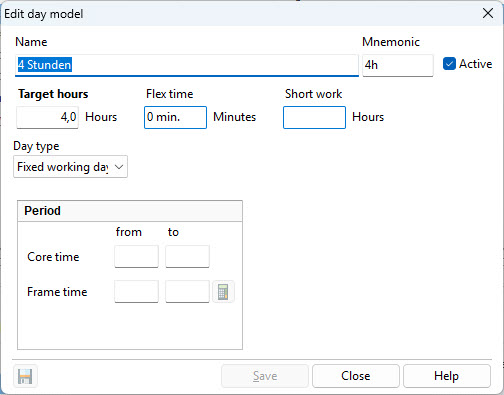
A working time model consists of individual daily models. Daily models define the daily framework time and core working hours, as well as any fixed breaks that must be observed.
The flexible break allows employees to distribute their break times individually throughout the day. The system displays a notification if the configured flexible break duration is exceeded. If you do not want this notification, set the flexible break to 0 minutes. Break time stamps are shown in the individual time entries.
If no flexible break is used and only the statutory German break regulation applies, the statutory break time is automatically deducted at the end of the day if no break was recorded. In this case, no break time stamp is created.
Part-time or mini-job: If there are days during the week that are available as working days but are not mandatory, you must create a daily model with a target time of 0 hours. This ensures that the system does not generate negative hours on these days.
To do this, open your working time model (for example, “24 hours”) and use the “Add” button to create a new daily model for Saturday.
Assign a descriptive name and set the target time to 0:00 hours.

In the next step, select the new daily model for Saturday and Sunday. In this example, the daily model is named “Saturday/Sunday” and has a target time of 0 hours.